
























Mobile Phone Repair Services in Yerevan
A cracked screen, weak battery, charging fault or phone that will not start may look straightforward, but similar symptoms can have different causes. Reliable mobile phone repair begins with the exact model, history and diagnosis, followed by approval of the part, price and data risks. Replacing a component without checking the cause can leave the original problem unresolved.
Turn.am lists independent phone-repair providers in Yerevan. You can compare their published services and contact them directly. Turn.am does not diagnose devices, supply parts, perform repairs or set warranty terms.
Describe the symptom and what happened before it
Give the manufacturer, exact model and storage variant if known. Explain whether the phone does not power on, restarts, drains quickly, overheats, charges intermittently, has no image or touch response, loses signal, has poor audio or shows a camera error. State when the problem began and whether it followed a drop, liquid exposure, update, charger change or previous repair.
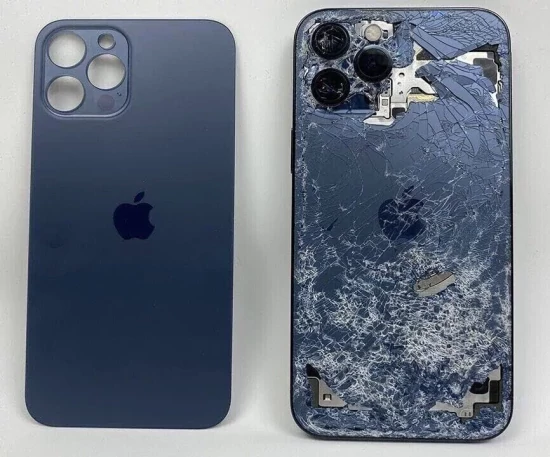
Photographs help with visible damage, but they do not confirm an internal cause. Ask whether the initial quote is for a specific replacement or remains subject to diagnosis. If several faults appeared together after impact or liquid, list all of them rather than requesting only a screen or port change.
Protect data before handing over the phone
Back up photos, contacts, messages and authentication information whenever the phone still works. A repair can require a reset or replacement of a storage-related component, and no shop should promise that data can never be lost. Remove a physical SIM and memory card unless they are necessary to reproduce the fault.
Ask whether the model offers a manufacturer repair or maintenance mode that lets technicians test the device without ordinary access to personal files. Availability varies by brand and software version. Do not send account passwords, banking codes or recovery keys in a message. If a passcode is genuinely needed for testing, agree why, how it will be handled and change it afterward; manufacturer-authorised procedures may require you to enter credentials yourself rather than disclose them.
Use an intake record and approve work after diagnosis
When leaving the phone, record its model or identifier, visible condition, accessories supplied, reported fault and whether it powers on. Photograph the front, back and frame. Obtain a receipt or job record showing who holds the device and how approval will be requested.
Before repair starts, confirm the diagnostic fee, expected response time and maximum amount that can be spent without new permission. The technician should explain the identified fault, proposed work and important uncertainty. If another damaged part is found after opening, request the revised total and effect on timing before authorising it.
Clarify the replacement part and resulting functions
“Screen,” “battery” or “camera” does not describe part quality. Ask whether the component is supplied through an authorised channel, new original, refurbished, aftermarket or donor part, and how that choice affects price, display quality, fit, battery reporting, water resistance and warranty. Avoid unsupported claims that every third-party part is identical to the factory component.
Some models require software configuration, calibration or completion of a manufacturer repair process after certain parts are installed. Ask whether all expected features, warnings and device history will work normally after the proposed repair. If the service is advertised as authorised, verify that status through the manufacturer’s current support channel.
Liquid damage and battery swelling need careful handling
After liquid exposure, disconnect charging and stop repeated power-on attempts. Do not use household heat or place the phone in rice; these steps do not remove contamination from internal assemblies. Tell the technician what liquid was involved, when it happened and whether the device was charged or switched on afterward. Cleaning may reveal corrosion or delayed faults, so a fixed outcome cannot be promised before inspection.
If the phone is swollen, unusually hot, hissing, smoking, leaking or has a lifted screen caused by the battery, stop using and charging it. Keep it away from flammable material and seek qualified handling. Do not press the screen back, puncture the battery or mail a visibly damaged battery without appropriate instructions.
What affects the repair price and warranty
Cost depends on the model, diagnosis, part type and availability, labour, board-level work, data-recovery requirements and urgency. Compare offers with the same part category and included work. A low display price may cover only glass, only labour or a lower-specification assembly.
Ask whether the fee includes diagnosis, part, installation, sealing, calibration and final testing. Written warranty terms should identify the repaired part or service, duration and exclusions. Accidental damage, new liquid exposure and unrelated faults are usually different issues; confirm the provider’s actual policy rather than assuming broad coverage.
Test the phone before leaving the shop
Inspect the frame, screen alignment and visible condition, then test the original fault and functions that could have been affected by opening the phone:
- display brightness, colour, touch and biometric unlocking;
- charging, cable fit and battery status;
- front and rear cameras, focus and flash;
- earpiece, loudspeaker, microphone and vibration;
- mobile network, Wi-Fi, Bluetooth and proximity sensor;
- buttons and any model-specific features discussed before repair.
Keep the receipt, part description and warranty. Restore or verify your data, remove any temporary access granted to the shop and change a shared passcode. If a function cannot be tested immediately, record it before accepting the device.
Browse mobile phone repair services on Turn.am and contact suitable technicians with the exact model and fault history.