



 07/07/2026

 3 mins to read
 At Turn.am, we continue adding tools that help service providers present their work better, build trust, and connect with new customers more easily.
This time, we have added a new feature: printable QR posters for collecting reviews.
Now service providers registered on Turn.am can download beautifully designed QR posters from their business account settings, print them, and present them to customers to collect reviews.
How the QR poster works
Every business and service on Turn.am has its own QR code. When a customer scans that QR code, they are taken directly to the relevant page, where they can leave a review and rating.
This is especially useful when the customer has already received the service and is satisfied with the result. Instead of explaining where they should go and how to leave a review, you simply show them the QR code.
The customer scans it, opens the page, and leaves their review.
Why reviews are important
Reviews on Turn.am are not just formal ratings. They help new customers understand what kind of experience other people have had with a particular specialist or company.
Good and genuine reviews increase trust, strengthen the credibility of your page, and can have a positive impact on the visibility of your services on Turn.am.
Users are more likely to choose service providers whose pages include real photos, complete information, and honest customer reviews.
Where you can use the QR poster
You can place the QR poster in different locations depending on your type of activity.
For example:
in a beauty salon,
in a medical or dental center,
at an auto service center,
in an office,
in a showroom or store,
in a service area,
or simply hand it to the customer after the service is completed.
If you provide services at the customer’s location, you can keep the QR poster on your phone or in printed form and show it to the customer after completing the work.
What formats are available
Several versions are available on Turn.am for different sizes and use cases.
You can download:
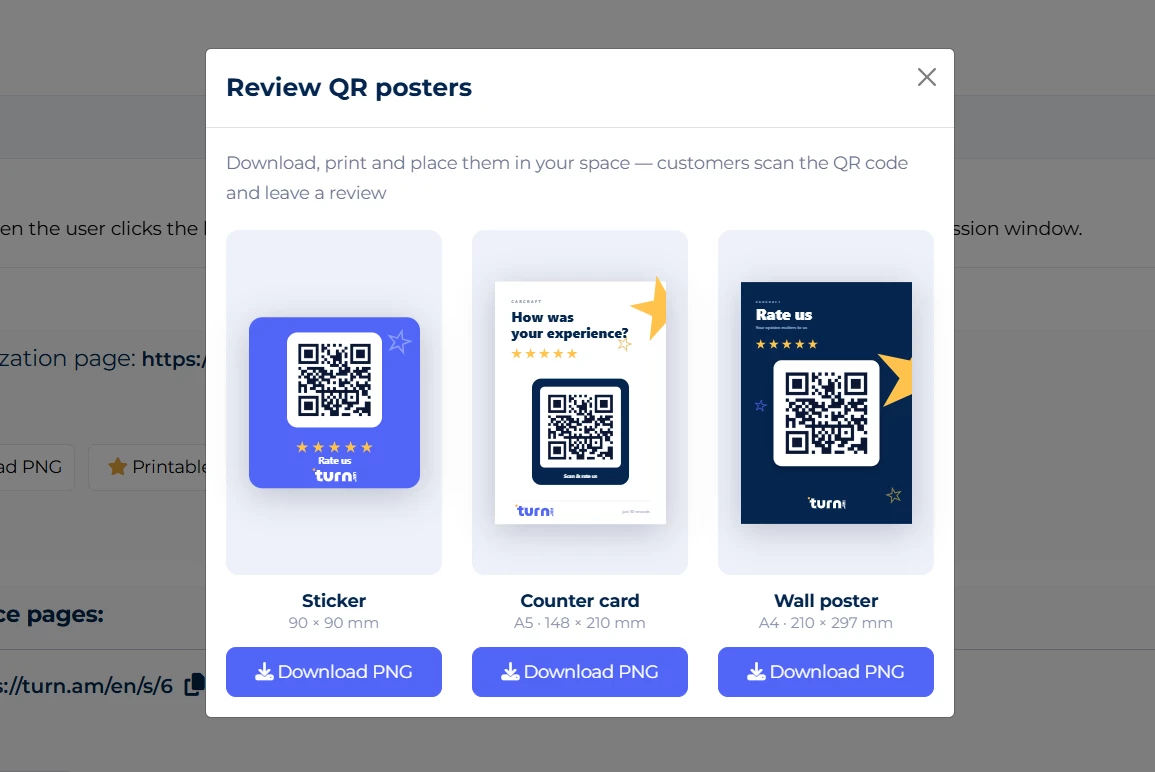
Square poster — suitable for small spaces, desks, or quick display.
Table card — suitable for a desk, reception area, or waiting room.
Wall poster — a larger version for placing in a visible location.
All versions are designed to be simple, beautiful, and easy for customers to understand.
How to download the QR poster
To download the QR poster, you need to:
- Log in to your Turn.am business account.
- Open the “Settings” section.
- Go to the bottom part of the page.
- Choose the design that suits you best.
- Click the “Download PNG” button.
- Print the poster and use it with your customers.
How to ask for a review correctly
When asking for a review, it is important to do it naturally and sincerely. For example, you can say:
“If you are satisfied with our work, we would really appreciate it if you scan this QR code and leave your review on Turn.am.”
You should not pressure the customer or guide them to write only a positive review. The most valuable review is a real and honest one.
Conclusion
The new QR poster feature was created so that specialists and companies registered on Turn.am can collect customer reviews more easily and strengthen their presence on the platform.
If you have not used this feature yet, log in to your business account, download the QR poster, and start collecting real reviews from your customers more actively.
Turn.am — a search platform for specialists and services in Armenia.